 TetherInvert
Metadata#
TetherInvert keeps two kinds of metadata for every frame:
- What you shot: the camera, film and dates. TetherInvert cannot know these, so you type them in once per roll, and per frame if you like. Every field is optional; an empty one is not written.
- How it was scanned: the scanning camera, light, preset and flat field. TetherInvert records these by itself.
Both go into every TIFF of the roll (scans/, prints/, negative/) as XMP, so they travel with the
file to any editor. Camera, film and dates also appear on the contact sheet.
For how the fields appear in Lightroom, see Lightroom Classic.
The roll#
The roll's metadata is on the Roll page, filled in before a new session starts (see Starting a session) and changed there at any time. Finish shows it as it is in the files; Edit… there opens this form.
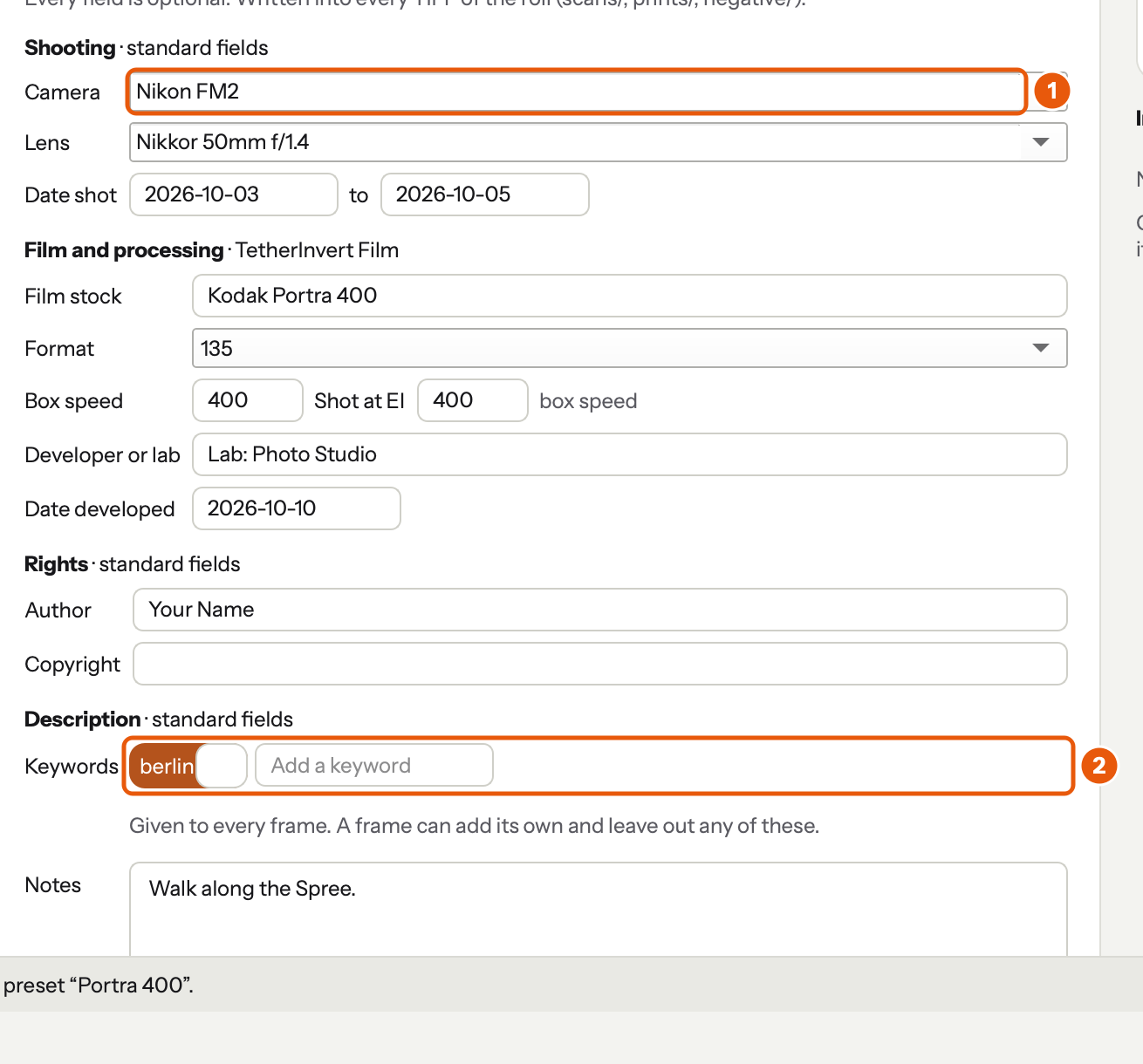
- Camera and Lens offer what you typed before.
- Keywords: Enter or a comma adds one.
| Group | Fields |
|---|---|
| Shooting | camera, lens, date shot (from, to). Camera and lens offer what you typed before. |
| Film and processing | film stock, format (135, 120 6×4.5, 6×6, 6×7, 6×9: the contact sheet's layout), box speed, the EI you shot at (the push or pull is shown beside it), developer or lab, date developed |
| Rights | author, copyright |
| Description | keywords (Enter or a comma adds one), notes |
| Scanning | read only, recorded by TetherInvert (below) |
Copy from roll… takes another roll's fields.
A frame#
Open a frame on Develop, then click Frame metadata above it, or press L.

- Frame metadata opens and closes the row. It stays as you leave it.
- The fields: aperture and shutter as you shot it, the date (empty means the roll's first day), a note, keywords.
The roll's keywords are shown outlined: × leaves one out on this frame only. The frame's own are filled. A field that is not taken (1/60 typed as the aperture) is marked red, keeps what it had, and the log says why.
These fields start empty: they are never taken from the camera on the copy stand.
What TetherInvert records by itself#
The roll's name, the frame number and the kind of file (flat positive, linear negative, print); the scanning camera, light, preset and exposure; whether the flat field was applied and when it was captured; the scan time and TetherInvert's version; for a print, its base and corrections.
These are kept apart from the shooting fields, so an editor shows the camera you shot the film with, not the one on the copy stand.
When the files are written#
The metadata in the files always follows TetherInvert:
- A new roll: its fields are written when its session starts, into every file from then on.
- Save metadata (roll): written into every file of the roll at once.
- The frame row: saved a moment after you stop typing, and written into that frame's files.
- A rescan, a render, a print: the new file gets the metadata as it is at that moment.
Only the metadata is replaced; the pixels are not touched. An editor that has already read a file does not always notice the change: see Lightroom Classic.
Where it goes in the file#
| Field | Written as | Shown in editors as |
|---|---|---|
| Camera | tiff:Model |
Camera |
| Lens | aux:Lens, exifEX:LensModel |
Lens |
| Date shot (the frame's, else the roll's first day) | exif:DateTimeOriginal, photoshop:DateCreated |
Capture Time |
| EI, else box speed | exif:ISOSpeedRatings |
ISO |
| Aperture, shutter (frame) | exif:FNumber, exif:ExposureTime |
Exposure |
| Author, copyright | dc:creator, dc:rights |
Creator, Copyright |
| Note (frame), then notes (roll) | dc:description |
Caption |
| Keywords: the roll's but those left out, then the frame's | dc:subject |
Keywords |
| Film stock, format, box speed, EI, developer, date developed, last day shot | TetherInvert Film (XMP-tetherinvertFilm in exiftool) |
Lightroom, through the plug-in |
| Roll, frame, file, scanning camera, light, preset, exposure, flat field, scan time, software; for a print its base and corrections | TetherInvert Scan (XMP-tetherinvertScan) |
Lightroom, through the plug-in |
The standard fields (the first eight rows) are read by any editor that reads XMP. TetherInvert Film and TetherInvert Scan are TetherInvert's own: other programs keep them but don't show them, and Lightroom shows them through TetherInvert's plug-in. To see everything a file holds:
exiftool -XMP:all ~/Scans/Roll01/scans/Roll01_001.tif
On the command line#
tetherinvert metadata ~/Scans/Roll01 film="HP5 Plus" ei=800 sets the roll's fields and writes them into
its files; --frame 7 note="Anna" sets a frame's. See Command line.