 TetherInvert
Lightroom Classic#
TetherInvert works with Lightroom Classic through a small plug-in, which does two things:
- A hot folder: Lightroom adds the roll's files to its catalog as they are written, the flat scans while you scan, the prints when you print. Nothing is moved, copied or renamed.
- The TetherInvert fields: film stock, EI, developer, the scanning rig and more, in Lightroom's Metadata panel.
You can use the plug-in's fields without the hot folder, on files you import yourself (see Metadata in Lightroom). macOS only.
1. Open the roll in Lightroom#
Click Lightroom at the foot of the rail.
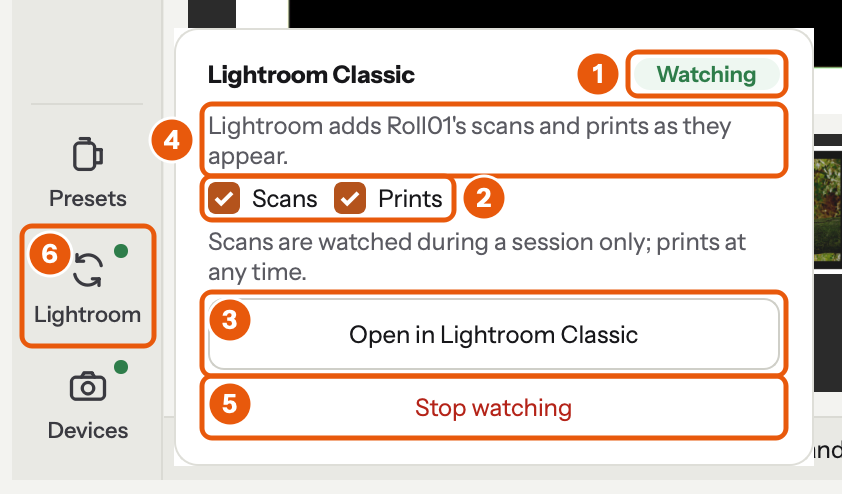
- The chip says what Lightroom is doing with the roll: Watching, Watching Roll02 (another roll), Not watching, Asking… (TetherInvert waits for its answer) or No answer.
- Tick what it should watch: Scans (
scans/, only during a session) and Prints (prints/, any time). Both are ticked at first. - Click Open in Lightroom Classic. Lightroom starts if it isn't running.
- The line says what Lightroom watches, and what the button would ask for when that is something else.
- Stop watching ends the watch, without starting Lightroom.
- The rail's Lightroom dot is green while Lightroom watches.
The first time, TetherInvert asks to install its plug-in. Say yes, and if Lightroom was already open, restart it once. This is also how you get the plug-in if you only want its fields: click the button once. Lightroom's own Auto Import can't stand in for the hot folder: its watched folder must be empty, and it moves the files away.
2. In Lightroom#
Every TIFF that appears is added where it is, under the roll's folder: Roll01 › scans and Roll01 › prints. Turn on Library › Show Photos in Subfolders to see both together.
- Files already there are added too.
- A frame rescanned or rendered again keeps its place in the catalog, with your edits; Lightroom shows the new picture.
- The watch lasts until you ask for other folders, until Stop watching (or Library › Plug-in Extras › TetherInvert: stop watching in Lightroom), or until Lightroom quits. A request from the same day is picked up again when Lightroom starts.
If the chip says No answer (TetherInvert waits two minutes), open File › Plug-in Manager in Lightroom: TetherInvert hot folder should be there and enabled.
Metadata in Lightroom#
What TetherInvert writes into its files is described in Metadata. In Lightroom, it splits into two kinds of field, and they are read differently:
| Standard fields | TetherInvert fields | |
|---|---|---|
| What | camera, lens, capture time, ISO, exposure, creator, copyright, caption, keywords | TetherInvert Film (film stock, format, box speed, EI, developer, dates) and TetherInvert Scan (roll, frame, scanning rig, flat field, a print's base and corrections) |
| Where | Lightroom's usual Metadata panel | choose TetherInvert at the top of the Metadata panel |
| Read by | Lightroom itself | the plug-in only: Lightroom never fills a plug-in's fields by itself |
The film fields can filter the Library (Library Filter › Metadata). The TetherInvert fields are read only in Lightroom: change them in TetherInvert.
Photos the hot folder added#
Everything is filled as each file is added. While the folder is watched, a change in TetherInvert is followed within seconds: the TetherInvert fields, caption, creator, copyright and keywords.
Photos you imported yourself#
After Import, Synchronize Folder or dragging files in, Lightroom has read the standard fields, but the TetherInvert fields are empty. To fill them:
- Click the roll's folder in the Folders panel. With Library › Show Photos in Subfolders on, its scans and prints are shown together.
- Choose Library › Plug-in Extras › TetherInvert: read metadata.
The command reads every photo shown, or the photos you selected when you selected more than one.
The dialog counts the photos updated, those already up to date, and those skipped because their file has no TetherInvert metadata (a file TetherInvert did not write).
Clicking Open in Lightroom Classic in TetherInvert does the same for the photos in the folders it starts watching: when it goes through files already in the catalog, it brings their fields up to date.
After you change metadata in TetherInvert#
TetherInvert writes the change into the files at once (see When the files are written). What Lightroom does with it:
| Fields | In a watched folder | Otherwise |
|---|---|---|
| TetherInvert fields, caption, creator, copyright, keywords | updated by themselves | TetherInvert: read metadata |
| Camera, lens, capture time, ISO, exposure | Metadata › Read Metadata from Files | Metadata › Read Metadata from Files |
Lightroom reads camera, lens, capture time, ISO and exposure only when a file is added; the SDK does not let the plug-in set them. So after typing a frame's aperture and shutter, for example, use Read Metadata from Files once. It replaces the catalog's metadata of those photos with the file's, including what you typed in Lightroom.
What the plug-in keeps apart from your own work in Lightroom:
- Keywords you add in Lightroom are never touched. The plug-in removes only keywords it added itself that TetherInvert no longer has.
- Caption, creator and copyright are taken from TetherInvert whenever it has a value for them, and left alone when it has none. Type them in TetherInvert, or leave them empty there.
The plug-in#
- After an update of TetherInvert, Open in Lightroom Classic updates the plug-in too, and the log says so. Restart Lightroom once afterwards.
- TetherInvert and the plug-in talk through three small files in
~/.tetherinvert/lightroom;plugin.logsays what was added, refreshed and read, and what was not. - Library › Plug-in Extras › TetherInvert: status says what the plug-in is watching.